




Best Website Builders 2026: Wix vs Squarespace vs Framer

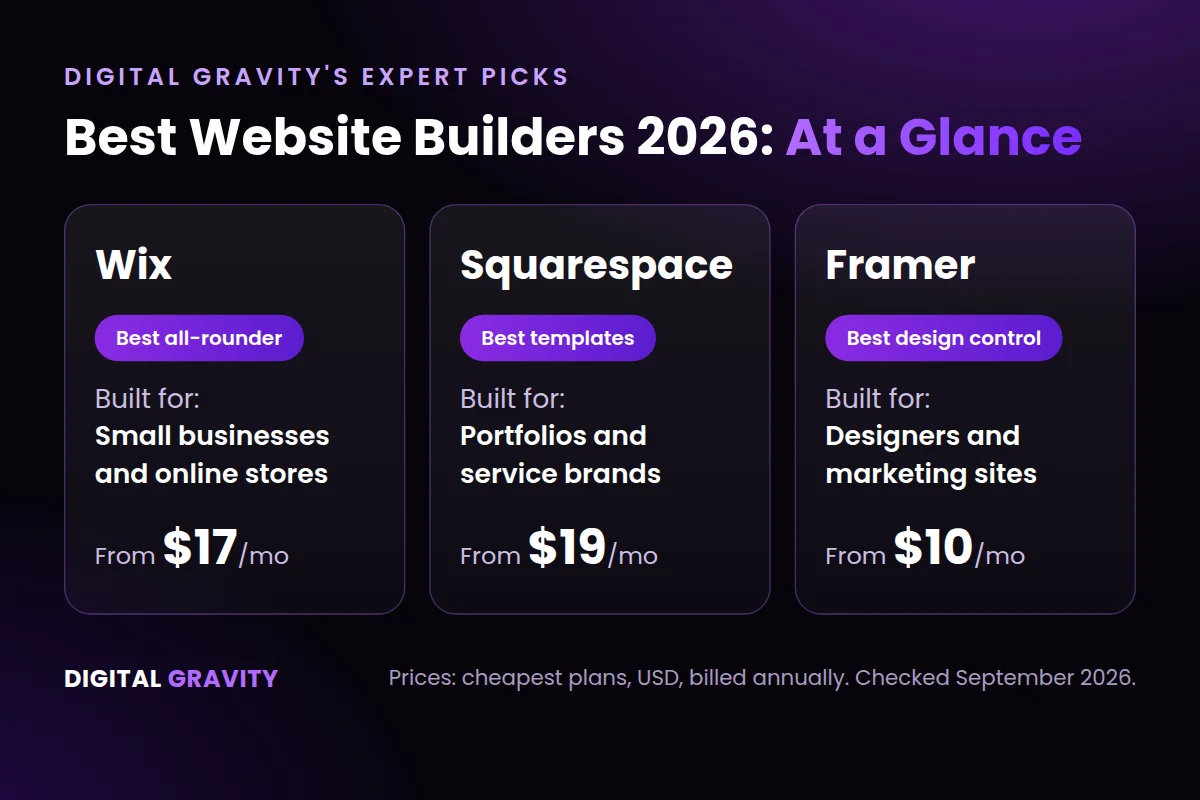
At Digital Gravity, we test website builders on live client projects, then implement the top performers for clients across the UAE and GCC. Our recent testing points to three of the best website builders worth using in 2026, based on the type of site being built.
- Wix suits small businesses and ecommerce stores. It comes with built-in payment and inventory tools, so a store owner can launch and start selling without hiring a developer.
- For portfolios and brand sites, Squarespace works well. Its templates keep typography and spacing consistent across every page, so a small studio’s site looks polished.
- Designers who want full control over layout and animation turn to Framer. Because it isn’t locked into fixed templates, a designer can build a site that matches their exact vision.
Here’s how to choose between Wix, Squarespace, and Framer.
Best Website Builders 2026: Quick Comparison
The table below puts the best website builders side by side, so you can shortlist a platform in under a minute.
| Website Builder | Built For | Time to Launch | Layout Control | Selling Online | Starting Price* | Why Digital Gravity Picks It |
|---|---|---|---|---|---|---|
| Wix | Online stores and small business websites | Launch a website the same day | Template-based, with drag-and-drop edits | Yes, with the Stripe option | $17/mo | Launches a website with online-selling ability fast, without a developer |
| Squarespace | Portfolio websites | Launch a website within a few days | The template holds its layout during and after edits | Built-in store, but Squarespace Payments isn’t available in the UAE | $19/mo | Builds websites with premium looks, without hiring a designer |
| Framer | Marketing websites | A designer with Figma experience can launch within days | Control over every part of the layout | Yes, but it needs a Shopify connection to sell | $10/mo | Gives a designer full control over layout and animation |
*This price is each builder’s cheapest plan that removes ads and allows a custom domain. Each builder bills it annually, in US dollars. Digital Gravity checked these prices on the official Wix, Squarespace, and Framer pricing pages in September 2026. A business on monthly billing, or paying in a different currency, should expect to pay more.
How Digital Gravity Tests the Best Website Builders
Digital Gravity scores every builder against five criteria. We apply the same criteria throughout our web design process for UAE businesses, so each score reflects real business needs rather than a feature checklist.
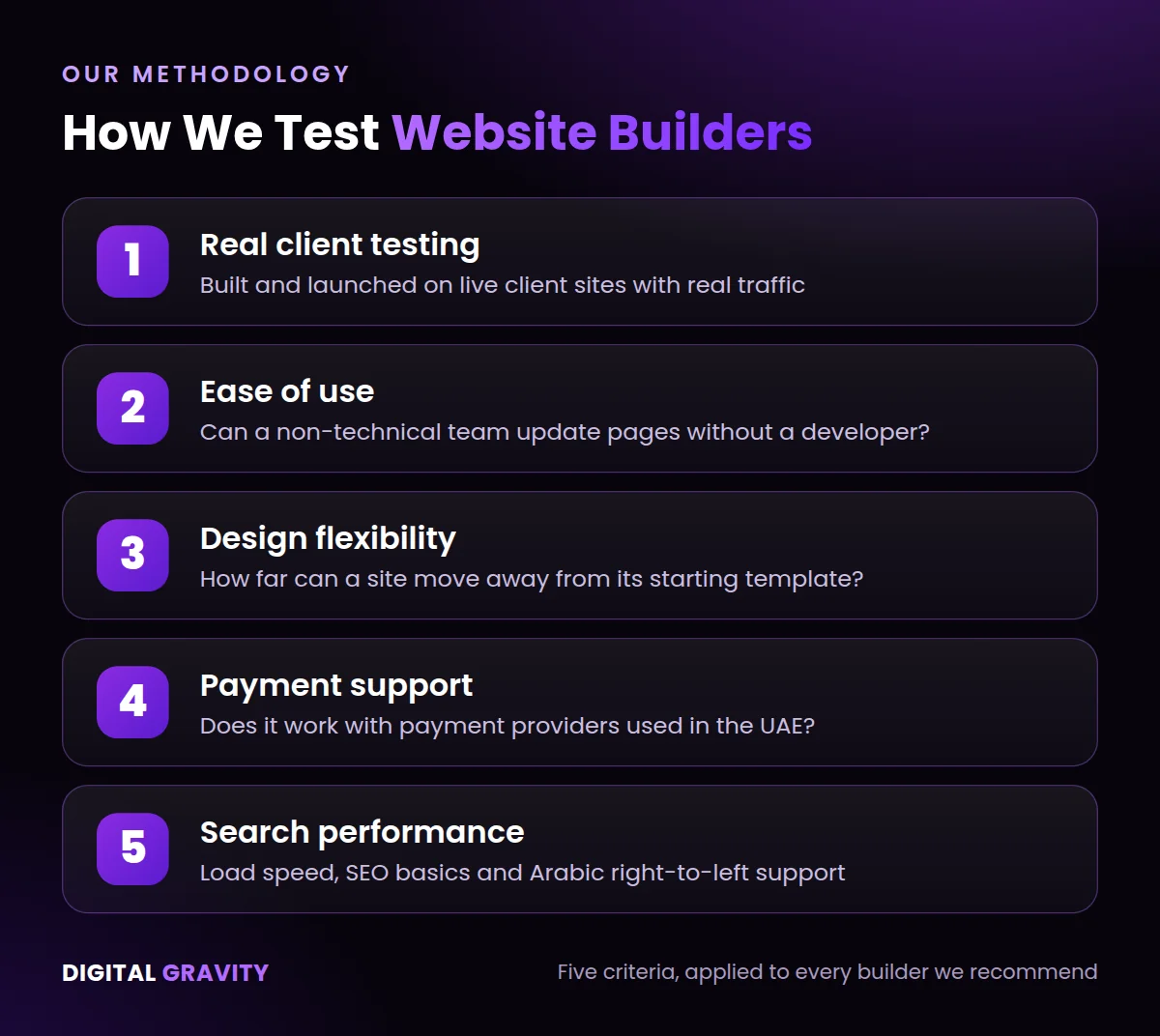
1- Real client testing: Digital Gravity builds and launches each builder on a live client site. Because the site carries real visitor traffic, the test results show how the builder performs under real use.
2- Ease of use for non-technical teams: We check how easily a non-technical team can edit each builder’s site. When a marketing manager can update pages without calling a developer, the team ships changes faster and spends less on ongoing maintenance.
3- Design flexibility: Digital Gravity checks how far a site can move away from its starting template. A builder that allows layout, spacing, and typography changes lets a brand’s site look distinct, instead of a default template look. For a deeper look at this trade-off, read our guide to custom website development vs templates.
4- Payment support: Our team tests each builder against the payment providers used in the UAE. A builder that connects directly to local payment gateways lets a client accept payments and manage bookings without any third-party plugin.
5- Search performance: At our agency, we measure how fast each builder’s sites load, since faster load times help a site rank higher in search results. We also check each builder’s Arabic and right-to-left layout support, so a bilingual audience can understand and use the site.
The Best Website Builders Reviewed: Wix, Squarespace and Framer
All three rank among the best website builders for UAE businesses, yet each one suits a different kind of project. Each review below covers what the builder does well, what it costs, and where it falls short.
1. Wix: Best All-Rounder for Small Businesses
Wix gets a small business’s site live in days. You can use either its drag-and-drop editor or its AI tool, which generates a starting layout from a short business brief. Wix’s app market then adds bookings, event pages, restaurant menus, and an online store on top of that site without needing a developer. That’s why Wix suits small and mid-sized UAE businesses running a site without an in-house web team. By contrast, a custom build takes longer, as our guide on how long it takes to build a website in Dubai explains.
Online Store
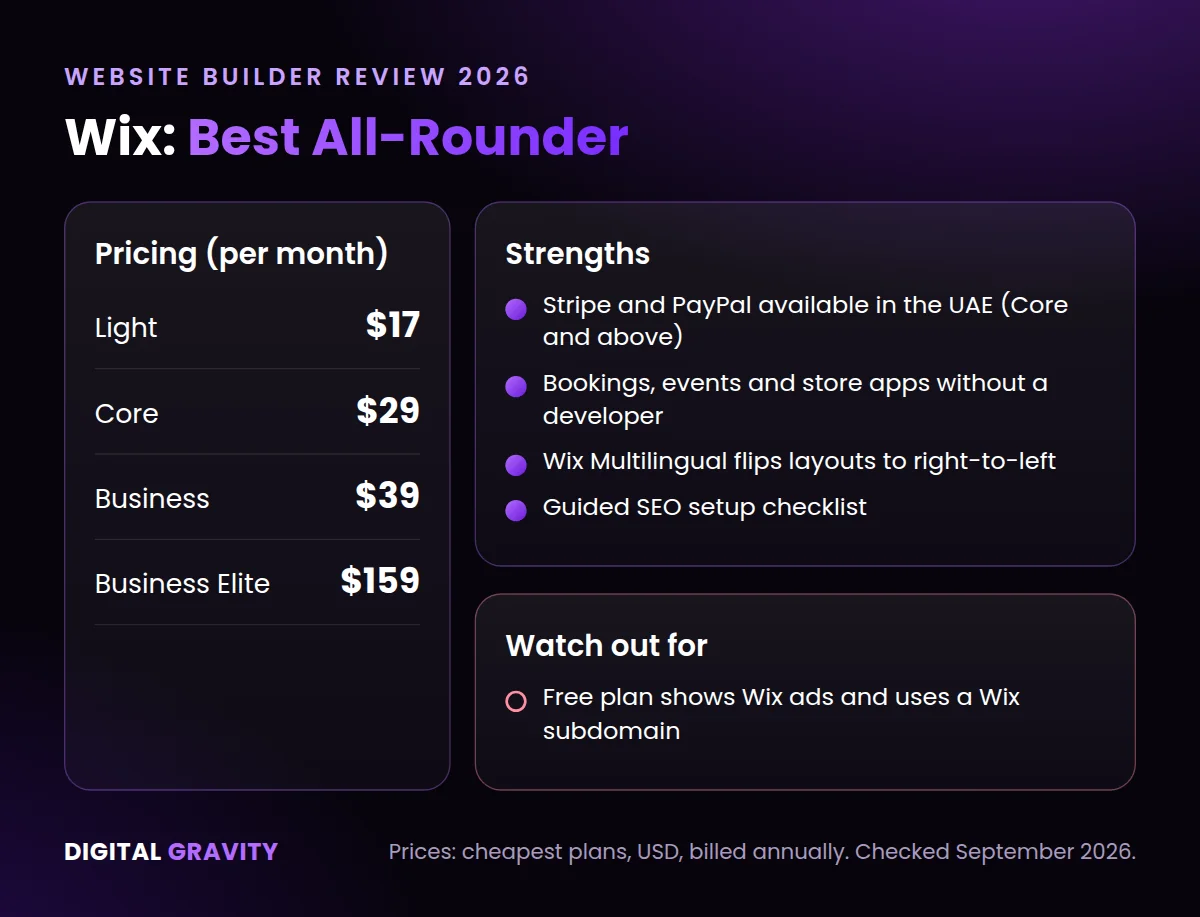
On the Core plan and above, Wix connects directly to Stripe. Because that connection is built in, UAE merchants can accept card payments. In fact, Wix lists Stripe and PayPal as the payment providers available in the UAE.
Booking Tools
Wix’s booking system also lets a service business take appointments directly through its site. As a result, customers can book a slot without the business setting up a separate scheduling tool.
Arabic Support
Wix Multilingual also switches a site’s layout to right-to-left. Because the layout flips correctly, a site’s menus, text, and images all display in the correct reading order for Arabic-speaking users.
Search Visibility
Wix’s setup checklist walks a site owner through the basic SEO steps to complete before a page goes live. Completing those steps improves the page’s chances of ranking. For competitive keywords, however, a checklist is only a starting point, which is where professional SEO services make the difference.
Pricing
Wix offers four paid plans: Light at $17 a month, Core at $29 a month, Business at $39 a month, and Business Elite at $159 a month, all billed annually. Wix also offers a free plan. However, that plan runs on a Wix subdomain and displays Wix ads on every page.
Digital Gravity’s Take
Digital Gravity recommends Wix for UAE small businesses that want to launch quickly and start selling online through Stripe without hiring a developer.
2. Squarespace: Best for Portfolios and Built-In Commerce
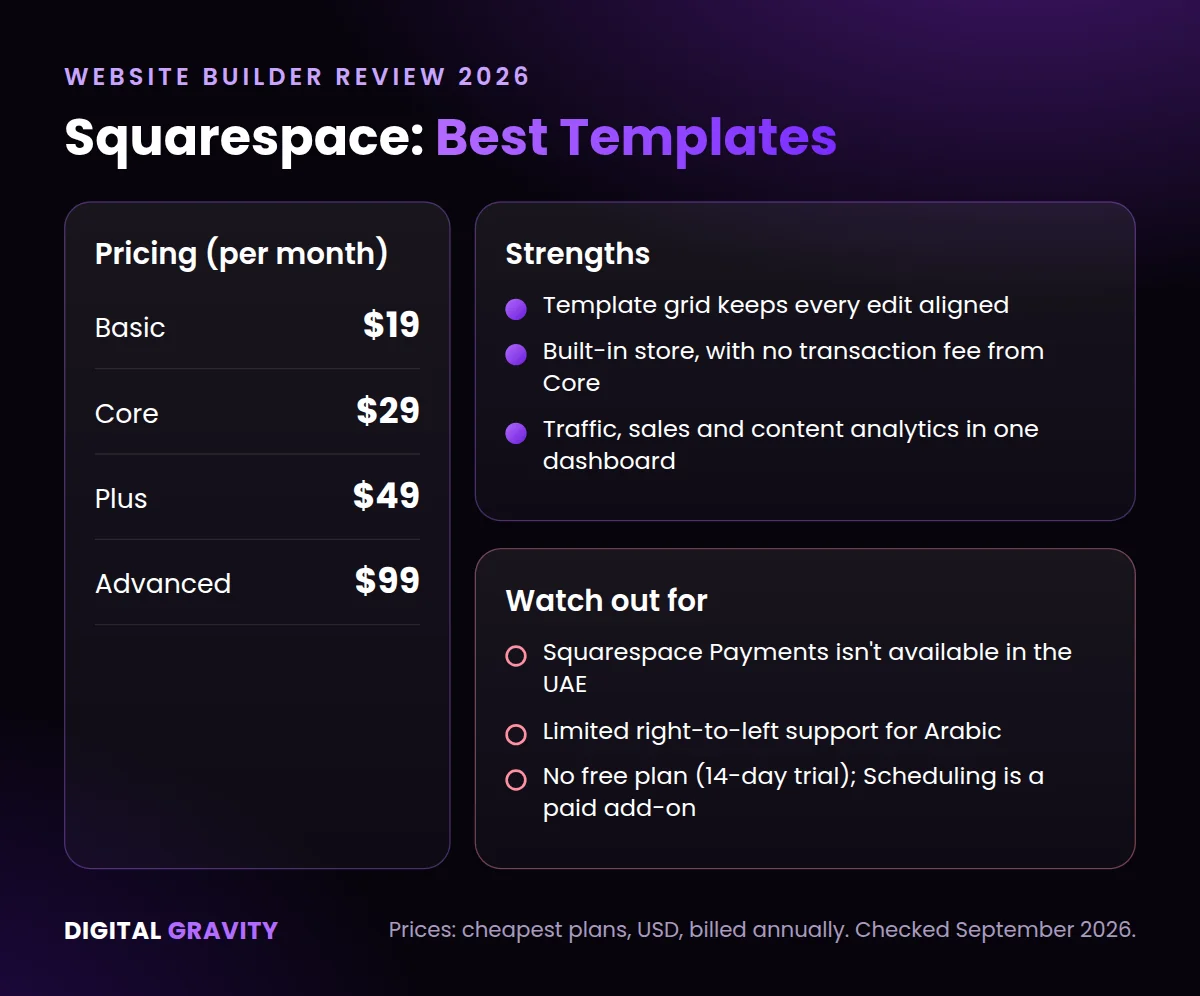
Squarespace’s templates hold their layout and spacing even after a non-designer edits the page. So a site keeps its premium look without needing a designer. Squarespace suits photographers, architects, interior designers, consultants, and boutique service brands that sell mainly through visual work.
Templates
Squarespace’s drag-and-drop editor lets a site owner move sections and images freely, while the template grid keeps every edit aligned. Because that grid holds the layout together, a page stays visually consistent even after months of small edits by anyone on the team.
Online Store
Squarespace also sells products, services, and digital downloads directly through its built-in store. On the Basic plan, Squarespace charges a 2% fee on every transaction. Upgrading to the Core plan removes that fee.
Booking Tools
A business owner can add appointment booking to their Squarespace site through Squarespace Scheduling. Because Scheduling is a paid add-on, it increases the site’s monthly cost beyond the base plan.
Site Analytics
Squarespace’s built-in analytics also track a site’s traffic, sales, and content performance in one dashboard. That way, a site owner can see what’s driving revenue without buying a paid analytics tool.
Pricing
Squarespace’s plans start at $19 a month on Basic, followed by Core at $29 and Plus at $49. The top Advanced plan costs $99 a month, and all four are billed annually. There’s no free plan, but users can get a 14-day free trial before billing starts.
Digital Gravity’s Take
Digital Gravity recommends Squarespace for English-language portfolio and service sites. However, UAE store owners should note two limits before choosing it. First, Squarespace Payments doesn’t operate in the UAE. Second, Squarespace’s RTL support isn’t built out enough to properly serve Arabic content.
Unsure whether a platform can handle Arabic, payments, and SEO all at once? Request a free web audit from our web design Dubai team.
3. Framer: Best for Designers and Marketing Sites
Framer allows pixel-level control over layout and how it responds across screen sizes. Because Framer’s editing model matches how Figma works, a team already working in Figma can move into Framer without relearning a new tool. Framer suits startups, SaaS brands, agencies, and campaign landing pages.
Layout Control
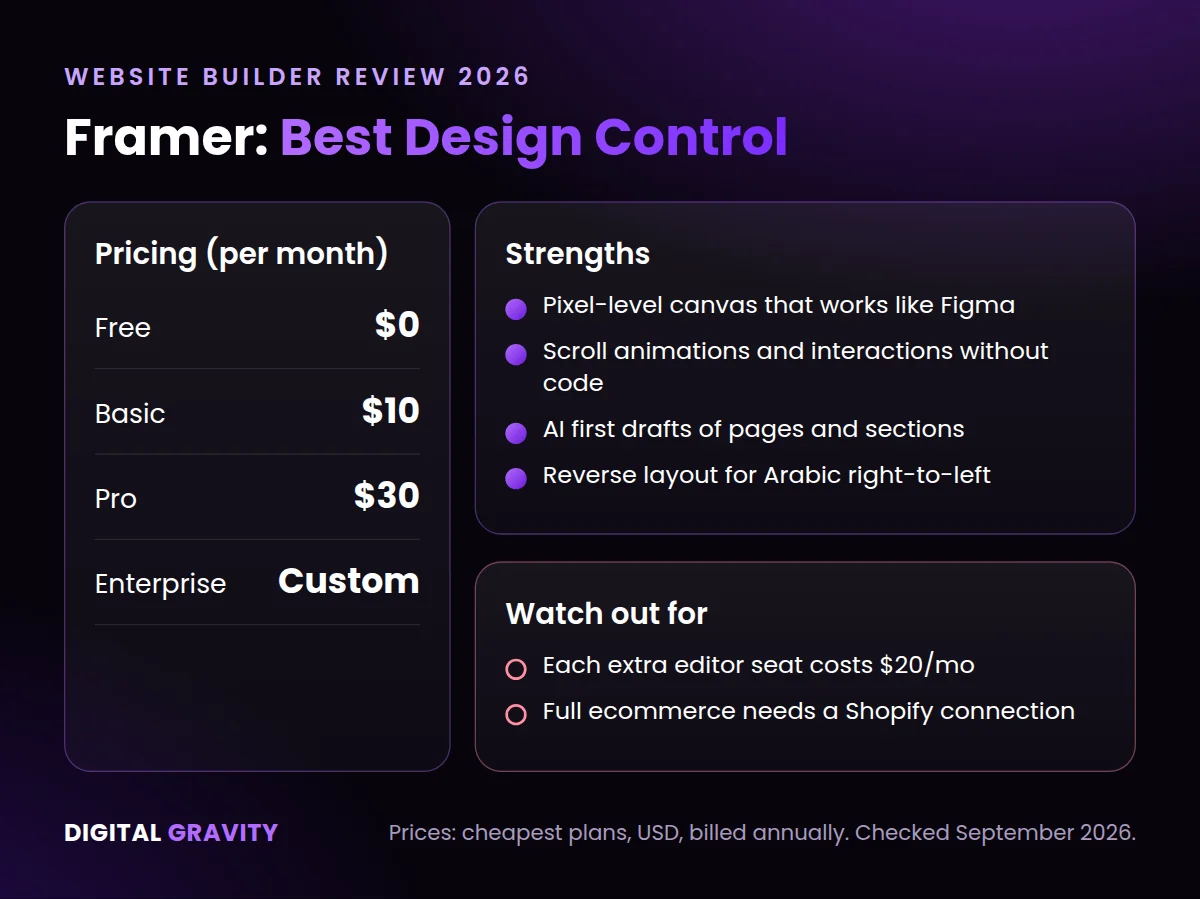
Framer’s canvas gives a designer pixel-level control over spacing, layout, and how each element resizes on different screens. That level of control lets a designer build a page that matches their exact visual concept. It also rewards teams with strong UI/UX design skills.
First Drafts
Framer’s AI tool also generates a first-draft page or section from a short brief. A designer can then edit that draft on the canvas. That helps the team start from a working layout instead of a blank page.
Animation
Framer lets you add scroll animations and interactive elements directly on the canvas, without writing code. Because those animations run natively in Framer, a marketing site can include motion that a template-based builder can’t reproduce.
Arabic Support
Framer’s localization settings include a Reverse layout option for right-to-left languages such as Arabic. When you switch it on, Framer flips stacks and grids for the Arabic locale. As a result, Arabic content displays in the correct right-to-left reading order.
Pricing
Framer offers a free plan, then two paid site plans: Basic at $10 a month and Pro at $30 a month, both billed annually. Larger organisations can also request a custom Enterprise plan. Each additional editor seat costs $20 a month, so a growing team’s monthly cost can rise fast.
Digital Gravity’s Take
Digital Gravity recommends Framer for designers and marketing teams that want full visual control over a website. For stores that need full ecommerce, we recommend pairing Framer with Shopify.
Which of the Best Website Builders Should Your Business Choose?
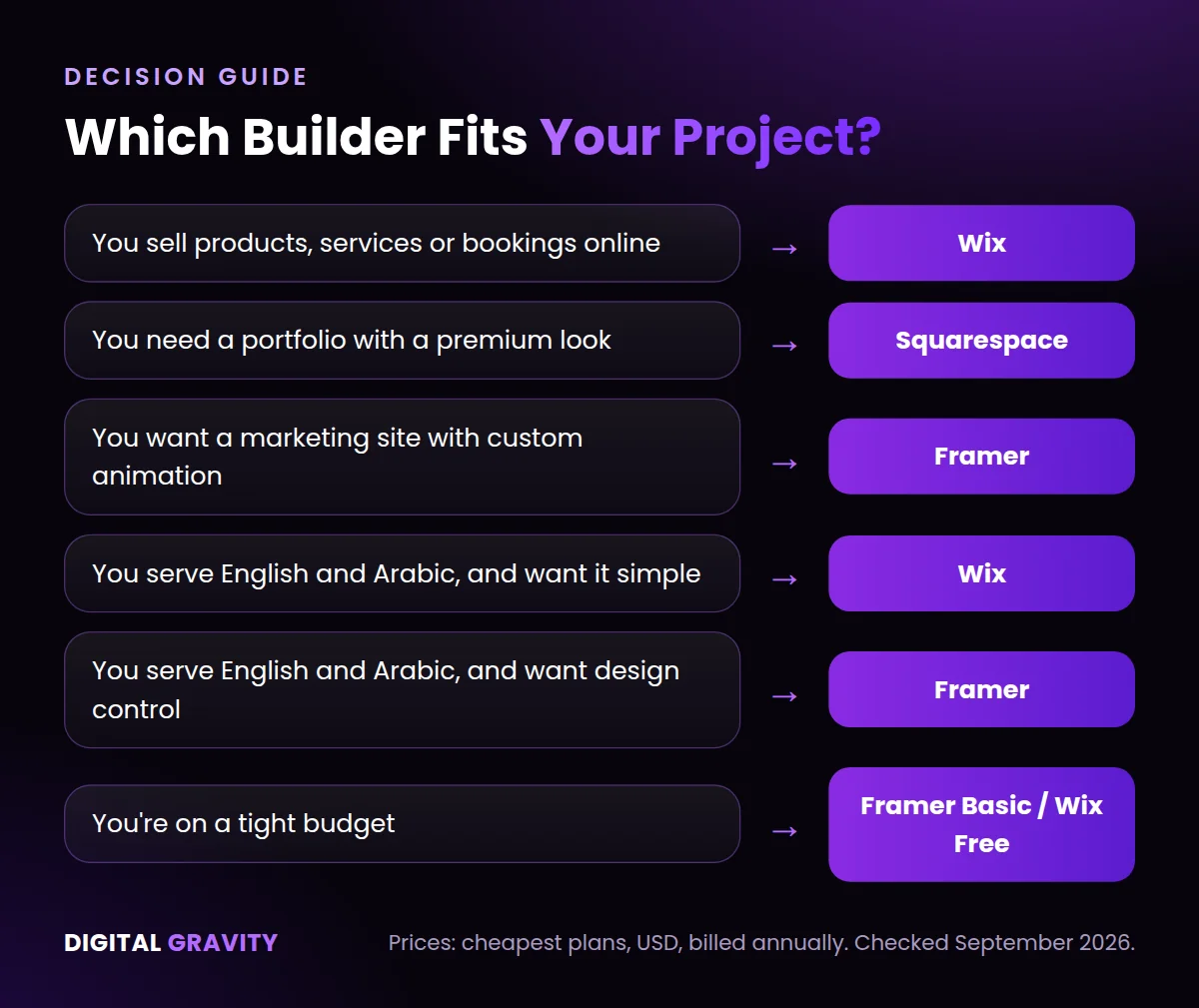
The right builder depends on what a business sells, who edits the site, and which language the site needs to serve. Here’s how Digital Gravity matches a project to a platform.
Selling Products or Services Online
A business that needs a store, bookings, and payments in one place should choose Wix. Because Wix connects directly to Stripe, a business owner can launch an online store without the confusion of choosing between plugins.
Building a Portfolio
Similarly, a photographer, consultant, or boutique brand should choose Squarespace. After all, its templates hold their layout even after a non-designer edits the page.
Building a Marketing Site
A startup or a new digital marketing agency that wants full control over layout and animation should choose Framer. With Framer, a designer can build every page around the visual concept they have in mind.
Serving Both English and Arabic Audiences
A business that wants a simple bilingual setup should choose Wix, since its Multilingual tool switches layouts to RTL. On the other hand, a business that wants full design control over its Arabic layout should choose Framer, since its Reverse layout setting flips the canvas for Arabic audiences. Not sure you need both languages? Our guide explains whether UAE businesses need a bilingual website.
Working With a Limited Budget
A business that needs a simple website should choose Framer’s Basic plan, priced at $10 a month. Alternatively, a business that wants to test a build before committing to a paid plan can start on Wix’s free plan.
Still unsure which platform fits your project? Book a free 30-minute consultation with Digital Gravity.
Best Website Builders FAQs
What Is the Best Website Builder in 2026?
Of the best website builders we tested, Wix is the best all-rounder for small businesses and online stores. Squarespace suits portfolio websites, while Framer suits designers who want full control over layout and animation. At Digital Gravity, we start most UAE small business projects on Wix. Then we move to Squarespace or Framer once the project’s design and language needs are clear.
Is Wix Better Than Squarespace?
A UAE business that sells online or needs a bilingual site should choose Wix over Squarespace. That’s because Wix connects directly to Stripe and switches layouts to right-to-left. Squarespace, on the other hand, fits brands that want a polished look without a designer on staff.
Is Framer Good for Beginners?
Yes. Framer suits beginners who already have design experience, especially Figma users, since Framer’s canvas works the same way Figma’s does. Complete beginners, however, will find Wix or Squarespace easier to learn.
Which Website Builder Is Best for Ecommerce?
Wix is the strongest ecommerce choice of the three. From its Core plan, Wix bundles product management, payment processing, and marketing tools into one dashboard. So a store owner can run a shop without connecting separate tools. For large catalogues, though, a dedicated ecommerce website development build on a platform such as Shopify is usually the better fit.
Which Website Builder Is the Cheapest?
Framer’s Basic plan is the cheapest for a live site with a custom domain, priced at $10 a month when billed annually. Wix offers a free plan, but that plan displays Wix ads and runs on a Wix subdomain instead of a custom domain. Squarespace starts at $19 a month and offers no free plan.
Ready to Build Your Website With Expert Support?
Even the best website builders need expert setup to perform well. Digital Gravity pairs the right website builder with design, development, and SEO work. That way, a client’s site is built to rank in search and convert visitors from day one.